FREE FOR WINDOWS · MAC COMING

Talk to your charts.
It does the rest.

The Trade Companion connects Claude AI to your own TradingView Desktop — it reads your charts, writes and compiles Pine Script, backtests, and stress-tests your strategies while you watch it work.

No catch. Free download, sent to your inbox. Unsubscribe anytime.
The Trade Companion building and backtesting an NQ strategy by chat
Real session: strategy built, compiled, backtested, and graded — from plain English.
Step one

You say it.
It happens.

No code. No scripting docs. You describe the strategy the way you'd tell a friend — the Companion writes the Pine Script, injects it into your editor, compiles it, and fixes its own errors until it runs.

✓ Writing Pine Script
✓ Compiled — first try
✓ Backtest complete: 308 trades
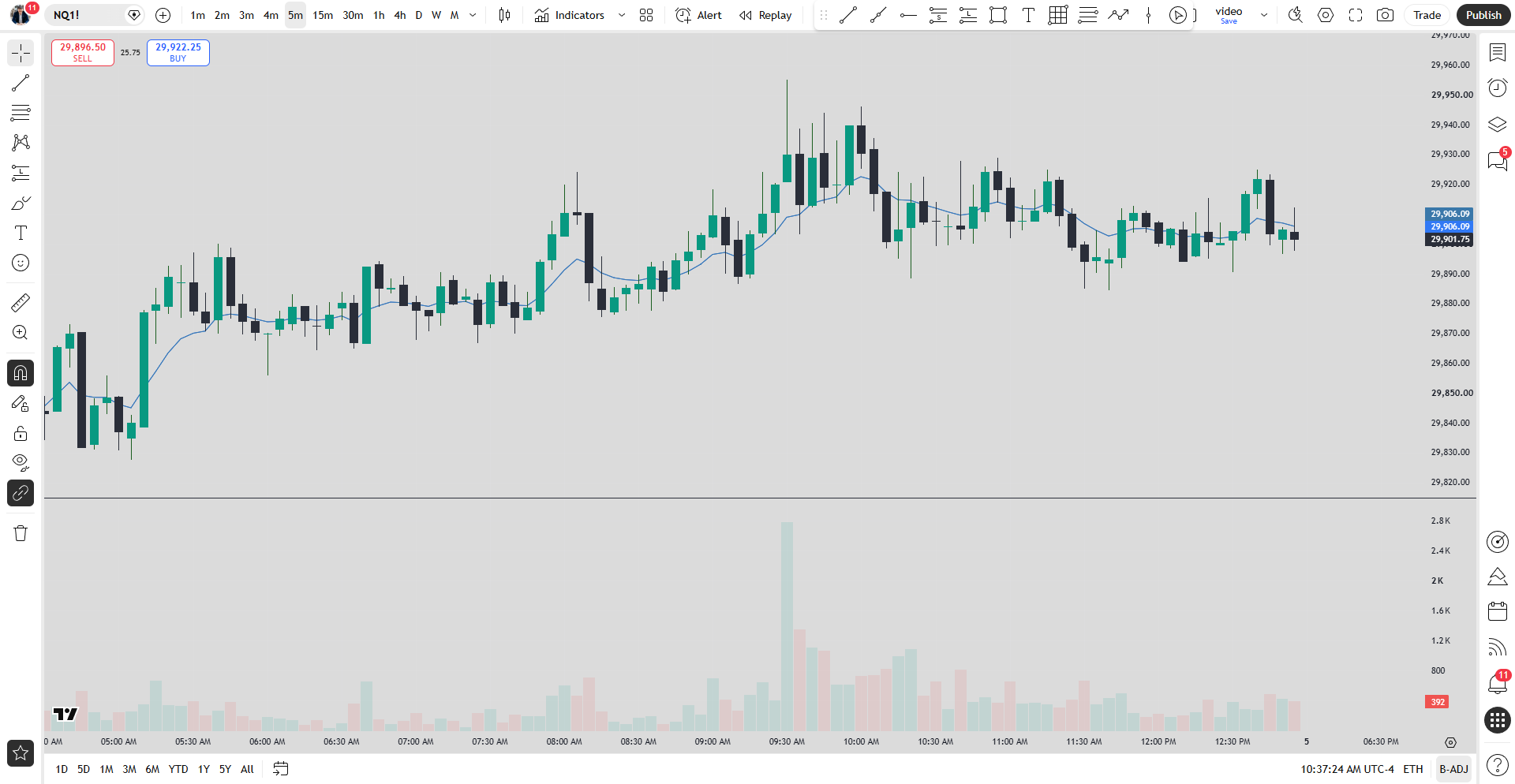
Live NQ futures chart in TradingView controlled by The Trade Companion
Nothing simulated

It drives your real TradingView.

Not a clone, not a sandbox — your actual TradingView Desktop, on your machine, with your indicators and your data. The Companion opens the editor, deploys the strategy, runs the tester, and reads the results back. You watch it happen live.
The part nobody else does

Then it tries to break your strategy.

One click runs your strategy through six-plus configurations — other timeframes, correlated symbols, data it never saw — and grades the wreckage honestly. Fragile gets called out, not celebrated.

B

15m 3-Candle Reversal (body entry, 60-day SMA)

Edge holds out-of-sample and down to 5m, but it's clock-locked to the 15m open and only marginal on ES.

0%win rate — all runs
0%runs profitable
0 configurations
0 total trades
$0 combined P&L
Profit factor by configuration (line = breakeven 1.0)
NQ 15m — baseline
1.91
NQ 15m — in-sample
2.09
NQ 15m — out-of-sample
1.80
NQ 5m
2.12
NQ 30m — structure
0.00
ES 15m — correlated
1.30
Historical backtest — hypothetical performance, shown as the app rendered it. Never a promise of results.
This is a real report from a real session — grade, flaws, and all. That's the point: it tells you the truth.
Blind spots, found

It catches what you'd never see.

Ask it anything about your results — P&L by hour, by weekday, by exit type. In this session it surfaced one quietly expensive habit: the strategy made money four days a week and gave a slice back every Friday. One sentence, found and fixed.

Net P&L by weekday (NQ 15m, body entry)
Mon
$2,320
Tue
$4,025
Wed
$5,365
Thu
$1,890
Fri
−$445
Fridays bleed. Now you know — and the fix is one settings change.
The full desk

Everything a trading desk
should have done for you.

🤖

Chart Copilot

Reads your symbols, timeframes, indicators, and price action in real time — and answers like an analyst.

Algo Builder

Writes Pine Script, injects it into your editor, compiles, and fixes its own errors. Code first, always.

🧪

Stress Tester

Six-plus configurations, out-of-sample splits, honest A–F grades. Fragile strategies get told.

☀️

Morning Brief

Your own pre-market checklist, answered item by item off your actual charts before the open.

🔔

Smart Alerts

Creates TradingView alerts and marks up levels — just describe what you want watched.

🔒

Private by design

Runs on your PC with your own accounts. Chats, strategies, and keys never leave your machine — only anonymous usage counts, with an off switch. No trades placed.

And when you're ready to go deeper

The Pro report suite.

Monte Carlo drawdown odds. Prop-firm eval survival across 7 firms' real rules. A full Eval Gameplan — pass plan, funded buffer, payout cadence. Included with the Purpose Driven Trader Academy.

🎲 Monte Carlo — 5,000 paths
🏦 Prop-firm eval survival
🎯 Eval Gameplan
📊 PDT Quality Score
Under five minutes

Three steps and you're live.

1

Install the app

One installer. Everything's inside — nothing else to download or configure.

2

Connect your Claude

Sign in with your Claude subscription (Pro/Max) or paste an API key once. Either way it stays on your computer.

3

Press Launch

The Trade Companion starts TradingView in connected mode. Green lights — start talking.

The Purpose Driven Trader

Built by Tyler — The Purpose Driven Trader

I trade NQ futures and teach the process on YouTube — the wins, the losses, and the discipline in between. I built this tool for my own trading desk and decided the community should have it too. No course upsell attached to this one. It's just free.

Financial Freedom for Kingdom Impact

Questions

Is it really free?

Yes. You give me your email, I give you the app plus occasional trading content. Unsubscribe anytime and keep the app.

What do I need?

Windows 10/11, the free TradingView Desktop app, and your own Claude account — a Claude subscription (Pro/Max) works, or an Anthropic API key (pay-as-you-go — typical chats cost cents). Your account, your key, and your charts never touch my servers.

Does it place live trades?

No. It reads charts, writes and backtests strategies, and manages alerts. It cannot touch your broker or your money.

Windows says "unrecognized app" when I install — is that safe?

You may see a blue SmartScreen prompt because this is a free community tool, not software from a big publisher. Click More info → Run anyway. The download popup here walks you through it, and the Microsoft Store version (coming soon) skips the warning entirely.

Is this affiliated with TradingView or Anthropic?

No — it's an independent tool. It connects to your own TradingView Desktop through a standard local debugging interface and to Claude with your own account. It doesn't bypass any paywall or subscription.

Your charts are waiting
to talk back.

Free. Five-minute setup. Your accounts, your data, your desk.

Get The Trade Companion →